 Open in ChatGPT
 Open in Claude
 Open in Gemini
 Open in Perplexity
WP-AEO is built on a single, non-negotiable principle: we never see your data. Your content, your API keys, your traffic, and your analytics all stay on your WordPress site. This page explains exactly how, and what that means for you.
Our four pledges
- No phone home. The plugin does not send your posts, scores, or usage data to any WP-AEO server. We don’t run one.
- Minimal account, only for Pro. WP-AEO Core needs no account at all. Pro requires only an email and password, and those exist solely to protect your license key. We never ask for anything more.
- Your keys, your calls. AI requests go directly from your server to the AI provider you chose. Nothing passes through us.
- No telemetry, ever. No analytics pixels, no “anonymous usage stats,” no opt-out toggle, because there’s nothing to opt out of.
What stays on your server
Every piece of data WP-AEO touches lives in your WordPress database, on your hosting. We have no access to any of it. That includes:
- AEO scores and analysis. The 11-criteria scoring results for each post are computed and stored locally as post meta.
- AI-generated summaries, FAQs, and takeaways. Saved as post meta on the post they belong to.
- Entity maps and Wikidata links. Stored as post meta, queried from Wikidata’s public API only when you trigger a lookup.
- Bot tracking logs. AI crawler visits (ChatGPT, Claude, Gemini, Perplexity, etc.) are counted in your database and never reported outward.
- Redirects, 404 logs, schema overrides. All SEO configuration is local to your site.
- Citation monitor results (Pro). Queries run from your server; results stored locally. No central citation database.
How API keys are handled
When you paste an OpenAI, Anthropic, or Google key into WP-AEO, it’s saved in your WordPress wp_options table, the same place WordPress stores all of its own settings. The key never leaves your server except in one direction: outbound HTTPS requests to the AI provider whose key it is.
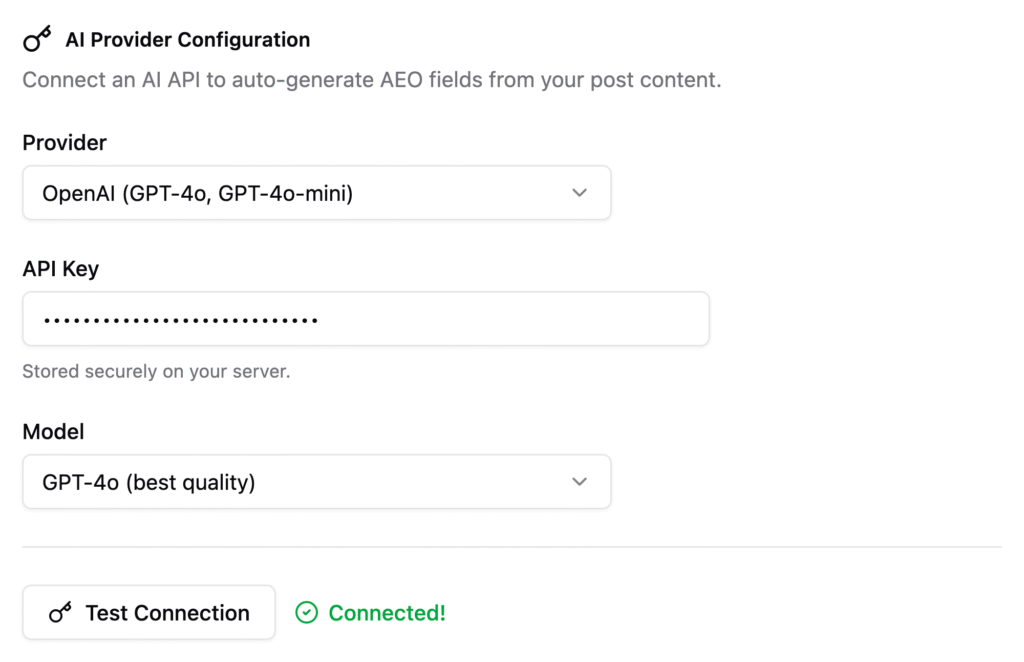
We don’t proxy those requests. We don’t log them. We don’t see the prompts or the responses. If you revoke the key from your provider’s dashboard, WP-AEO immediately loses access, because there is no second copy anywhere.
Your Pro account and license key
If you purchase WP-AEO Pro, you create an account on our licensing site using an email address and a password. This is the only personal information we ever hold, and we hold it only to deliver the product you paid for. Here is exactly what happens with each field:
- Your registration email. Used to send you the license key, renewal reminders, and critical security notices about the plugin. We do not send marketing emails unless you opt in, and we never sell, rent, or share your address with third parties.
- Your password. Stored only as a one-way hash (bcrypt) on our licensing site. We cannot read it, recover it, or share it. If you forget it, the reset flow generates a new one; the old password is not retrievable by anyone, including us.
- Your license key. Generated on our side and shown once in your account dashboard. When you paste it into the plugin, it is stored in your site’s
wp_optionstable and sent back to our licensing endpoint only to verify that the key is valid and still within its activation limit. The verification request contains the key, your site URL, and the plugin version. It does not contain your email, password, posts, analytics, API keys, or any other data.
Your login credentials stay on the licensing site and are never embedded in the plugin or transmitted by it. The plugin authenticates with the license key alone, so even a full read of your WordPress database would not expose your account password. You can deactivate a license, reset your password, or delete your account at any time from your dashboard, and doing so removes the corresponding record on our side.
What we publish for you (on purpose)
Some WP-AEO features are designed to make content more discoverable by AI crawlers. These are public by design, serve only content you’ve already published, and you can turn them off at any time in the plugin settings:
/llms.txt, an AI-crawler manifest of your public posts- Markdown endpoints for each published post
- AI-optimized XML sitemap
- JSON-LD schema embedded in your page source
None of these expose private or draft content, user accounts, or metadata beyond what’s already on the public version of the post.
How you can verify this
You don’t have to take our word for any of it. WP-AEO is a standard WordPress plugin, and every outbound request it can make is visible in the source code, and you can confirm the policy for yourself:
- Inspect the plugin’s PHP source in
/wp-content/plugins/wp-aeo/. Everywp_remote_request()call is a network egress point. - Run a network monitor (e.g. a firewall log or
tcpdumpon your server) and confirm traffic only goes to the providers listed above, only when you trigger an action. - Use a plugin like Query Monitor to watch HTTP requests from your dashboard in real time.
What happens when you uninstall
Removing the plugin removes its code. If you also choose “delete” in the WordPress plugins screen, the uninstall.php routine cleans up plugin-created options, post meta, and tables. Since nothing was ever stored outside your site, there is nothing left behind on our end. There is no “our end” to clean up.
A warning about cracked and “nulled” versions
Every privacy guarantee on this page assumes you installed WP-AEO Pro from our official site or an authorized reseller. Please do not use cracked, nulled, “pre-activated,” or otherwise redistributed copies of the plugin. Those copies come from third-party sources that we have no relationship with and no visibility into, and they are one of the most common ways malware gets onto WordPress sites.
When a plugin is “nulled,” someone strips out the license check and repackages the code. In the process, they almost always add something of their own. Security researchers repeatedly find the same patterns in these builds:
- Hidden backdoor admin accounts that give the attacker permanent access to your site
- Silent code that forwards your WordPress database, API keys, and admin credentials to servers you have never heard of
- SEO spam injection, affiliate link hijacking, and redirects that only appear to search engines or first-time visitors
- Cryptominers and web shells that stay dormant for weeks before activating
- Auto-updaters that phone a third-party host, giving that host the ability to push new malicious code at any time
Because a nulled copy is modified before it reaches you, none of the audit steps earlier in this document apply. The source code in your plugin folder is no longer the same code we published. We cannot verify it, patch it, or vouch for it, and the zero knowledge guarantee ends the moment someone else’s code runs alongside ours.
The cost of a single compromised WordPress site (stolen customer data, blacklisted domain, lost search rankings, incident cleanup) is routinely many times the price of a legitimate Pro license. If budget is the issue, contact us about a discount before you install a cracked copy. It is almost always cheaper to ask.
Only install WP-AEO Pro from: your official account dashboard, or a reseller explicitly listed on our website. If in doubt, ask us first.